

MVI Release 12.2 new features
Release 12.2: A major leap forward for the MVI Software Suite
We are thrilled to announce the immediate availability of MVI AudioVisual Release 12.2. A significant update packed with groundbreaking features and substantial improvements designed to elevate your experience and streamline your operations. This release underscores our commitment to innovation based on our customers demands, delivering advanced functionalities across the entire MVI Software Suite.
Enhanced functionality and cross-platform expansion in EasyConf Control
One of the most transformative elements of Release 12.2 is the comprehensive overhaul of EasyConf Control. In a strategic move to align with the modernisation the Control Client was redesigned from the ground up on Windows, Android, and iOS, and we’re now adding something our users have asked for repeatedly: native support for macOS.
The result is a unified experience across virtually all devices used inside meeting rooms, from touch panels and nameplates to laptops and tablets. All settings and configurations migrate seamlessly and the interface behaves identically across platforms. Keyboard-only operation is now fully supported, multilingual layouts adapt perfectly, including right-to-left languages, and even Android devices without touchscreen support can fall back on mouse control.
The Raspberry Pi version will follow soon with the same new design. For now, users can update through the App Store (iOS + macOS), download the APK for Android, or simply connect their Windows device to a 12.2 server to update automatically.
Lower thirds reinvented in EasyCam
For EasyCam, we’re introducing a completely new system for lower thirds, and it’s a big jump forward in visual communication. The old rendering engine has been replaced with a web-based system built on HTML, CSS, and JavaScript. This means smoother animations, sharper layouts, and almost endless design flexibility. EasyCam now ships with three new templates to get you started. From there you can build nearly anything you can imagine. If you can code it in common web technologies, you can turn it into a lower third.

Live transcription and subtitles generated on premise
Another flagship addition is our new transcription module. It brings real-time subtitles and full meeting transcription directly into your own infrastructure meaning: no cloud dependency, no external processing. Subtitles appear smoothly in EasyCam, and operators can output a subtitled and non-subtitled version simultaneously, which is ideal when streaming platforms generate their own captions.
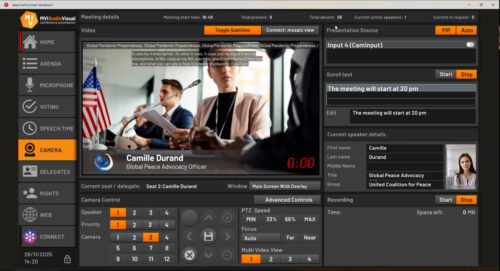
Reporting takes a major step forward as well. We’ve added a dedicated transcription report that merges meeting metadata such as attendance and speaker timestamps with the generated transcript. After the meeting, an editor lets you touch up the AI-generated text. All transcription data is stored as metadata, giving you more control over archival and searchability.
At its core, this module works with an on-premise speech-to-text AI engine, built upon OpenAI Whisper’s robust open-source technology, integrated via our new EasyConf Adapter for Transcription. It supports many languages and can be swapped out for another provider through our open API, if needed. Since live speech-to-text can be demanding on hardware, we’ve added a knowledge base article covering performance expectations.
Customise your reports
The Reporter gains more flexibility in personalisation options with the introduction of themes. It now includes a clean print-friendly theme and a standard MVI theme. On top of that, you can generate a complete attendance report with a single click for any chosen timeframe.
A smarter way to display your meeting information
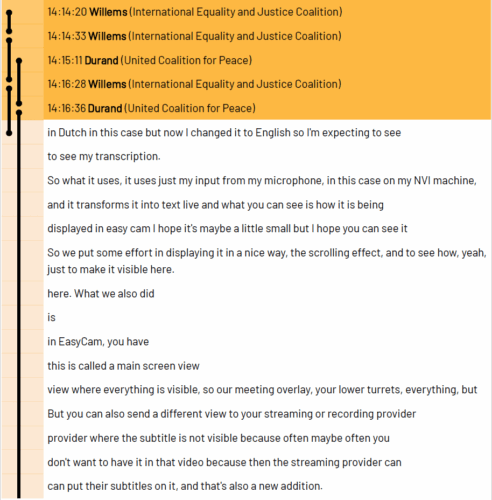
We noticed many councils ingeniously adapted our ‘agenda on top’ templates for meeting information, but recognised the need for a more robust, dedicated solution. The ‘Meeting info overlay’ component now dynamically showcases the active meeting, agenda, or vote title, eliminating manual updates and ensuring your audience is always informed. With long titles scrolling smoothly we ensure everything remains readable on any screen.
Block out the public with the confidentiality mode
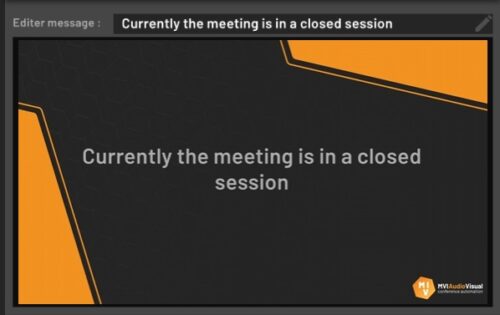
Confidentiality mode has become far more flexible. Operators can now choose exactly which video outputs get blocked. For example, you can block the livestream while keeping in-room displays and DelegateUI fully active. EasyConf Connect now also supports confidentiality mode and can partially block selected groups of participants. Mosaic views can even show only participants with voting rights.
New feature: Breakout rooms for remote participants
EasyConf Connect now includes breakout rooms. With a single action, operators can move all remote participants into a separate room and bring them back when needed. It’s simple, fast, and designed specifically for meeting workflows.
More powerful video template view
The Video Template View has been fundamentally restructured, offering more flexibility. You can now combine meeting information, vote results, and video layouts in whatever way fits your workflow. Automatic triggers are now possible, and everything is configured through the new EasyCam Video Template client in EasyConf.
Get deeper insights in your system’s performance
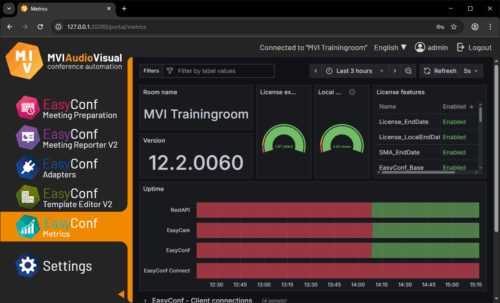
We’ve added a completely new metrics dashboard that tracks system performance over time. It gives a clear view of usage, load, and behavior across the entire ecosystem. This is especially helpful for IT teams managing large deployments.
Expanding our DMS support
Release 12.2 also extends its innovative reach across the broader MVI AudioVisual ecosystem. We’re expanding international DMS support by adding new adapters for Harbour Software (Australia) and ALLRIS (Germany). These integrations synchronise meeting data into the MVI suite and push voting results back to the DMS. Streamlining preparation and documentation even further.
Further improvements
The rest of this release is filled with refinements that collectively make the system feel smoother and more consistent.
The scrolltext engine now supports more fonts and character sets, including right-to-left scrolling for Arabic.
The template editor gains unified button, label, and text-area types, plus wireframing for components that will be expanded in future releases.
And camera brand support still continues to grow.
Meeting defaults have moved to the Portal.
DMS adapters can now select their base meeting template.
EasyConf Control’s browser configuration can resolve portal addresses automatically.
And Connect invitations can format dates and times according to the chosen locale.
Setting a new standard
We are proud of this release. We believe it is more than an update. It’s a step change. With new platforms, new rendering engines, new transcription module, expanded integrations, and countless workflow improvements, the MVI suite becomes more capable and more future-proof than ever.
Don’t hesitate to submit your wishes for new or enhanced features.
If you want support activating any of the new modules or features, we’re ready to assist.